As a programmer, we spend lots of time on developing software. In order to protect our eyes, a dark theme in eclipse is recommended. The following steps will show how to replace the default eclipse white theme by a dark one.
1. Choose a Eclipse Color Theme
Go to http://www.eclipsecolorthemes.org/, select whatever color theme you like. I prefer the Vibrant lnk theme.

Choose a Eclipse Color Theme
Download the eclipse preferences file.

Download a Eclipse Color Theme
2. Import the Preferences File
Eclipse -> File -> Import -> General -> Preference.

Then browse the file and finish.

Import the Eclipse Preferences File
After that, you would see it take effect immediately. However, I don't like the backgroud color of highlighted text. It almost makes me unable to recognize the words. I tried different themes to prevent this probelm. Unfortunately, no one could help.
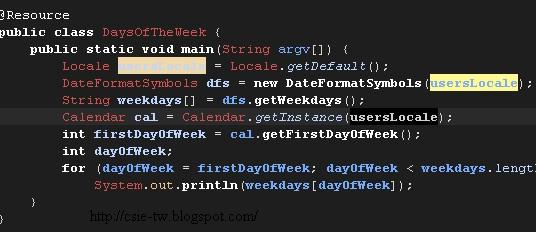
The Vibrant lnk eclipse theme
3. Customize the background of highlighted text
Actually, eclipse allow us to modify the theme. Go to Eclipse -> Preferences -> General -> Editors -> Annotations and you need to change all Occurrences and Write occurrences.

Customize the background of highlighted text
Finally, you would see this setting makes highlighted text clear.

The modified Vibrant lnk eclipse theme


