2012/01/27

悠遊卡電子發票與自然人憑證歸戶 電子發票自動兌獎與匯款(圖文懶人包教學)

關鍵字:電子發票如何對獎,電子發票整合服務平台,電子發票對獎,電子發票app,7-11電子發票,電子發票申請,紙本電子發票,電子發票平台,財政部電子發票整合服務平台,電子發票怎對獎

統一超商配合政府實施電子發票作業後,相信大部分的人還是拿了紙本的發票。根據財政部估計,若全國發票電子化,每年可省下1200億元及11萬顆樹。其實只要簡單的步驟,就可以自動對獎,甚至自動匯款到指定銀行帳戶,環保且方便,何樂而不為。

電子發票的3種型態

1. 依舊拿紙本電子發票:紙本電子發票跟傳統的統一發票是一樣的,自行保管與兌獎。對獎號碼就在紙上,去除2個為首的英文,後面就是可兌獎的號碼。比如:AB-12345678,對獎號碼就是12345678。

2. 使用悠遊卡/icash,且告訴店員使用電子發票:雖然說使用電子發票,但還是會有一張交易明細(上面無對獎號碼),可以在開獎後到ibon查詢,如果中獎可以列印出來到郵局兌換。雖然還是會拿到明細(比較小張),但店家不會再保有存根聯,所以省了一半的紙。

3. 使用自然人憑證+悠遊卡/icash,且告訴店員使用電子發票:設定完後,系統自動對獎,且財政部會自動匯款到指定帳戶。PS 1:自然人憑證只在設定帳戶時使用,未來購物時只需要悠遊卡PS 2:統一超商從民國101年4月2號,如果你們說要紙本發票,將假設你使用電子發票。

 image

發票(人工兌獎) 與 交易明細(電腦兌獎)

自然人憑證設定

以下就介紹如何使用自然人憑證設定銀行帳號,並且將悠遊卡/icash等載具歸戶到自然人憑證。

 image

悠遊卡/icash等卡片載具歸戶到自然人憑證


首先到財政部電子發票整合服務平台(經測試IE6無法正確執行,請更新到IE8),開通自然人與設定銀行帳戶:

image

剛進去網站時,點選上方的「執行附加元件」

 自然人電子發票 (2)

確定安裝元件,點選「執行」

2012-01-27_222652 

進入電子發票平台後,輸入PIN碼

自然人憑證預設 PIN 碼為申請人的民國年出生年月日共六碼 ,如 63 年 5 月 1 日 生則預設的初始 PIN 碼為 630501 。如果想更改PIN碼或是鎖卡解碼,可以參考自然人憑證鎖卡解碼及修改PIN碼相關設定說明

  自然人電子發票 (3)

第一次登入後設定資本資料。銀行戶名要跟自然人憑證姓名相同!


 自然人電子發票 (4)

確認資料無誤後,按下「送出申請」

卡片歸戶

基本上這樣子自然人憑證就已經開通了。接下來就來設定卡片歸戶,由於悠遊卡為感應式的卡片,所以家裡的讀卡機無法讀取,只能到7-11使用IBON設定悠遊卡歸戶。 ibon電子發票

到 IBON 首頁,按下「生活」

 ibon電子發票 (1)

點選「電子發票」

 ibon電子發票 (2)

點選「載具(卡片)歸戶」

ibon電子發票 (3)

出現這個畫面的時候...


ibon電子發票 (4)

將自然人憑證插入

ibon電子發票 (5)

輸入自然人憑證PIN碼 (預設為生日,如680125)


ibon電子發票 (6)

選擇卡片類型 


ibon電子發票 (7)

出現這個畫面時...


ibon電子發票 (8)

將 悠遊卡/icash 移到機器左方的感應區,並且按下螢幕上的「確定」

ibon電子發票 (9)

最後確認


ibon電子發票 (10)

歸戶完成!

基本上,所有的動作就完成了,如果你不放心,可以登入電子發票平台查看載具管理列表。

自然人電子發票 (5)

點選載具管理列表

 自然人電子發票 (7)

會顯示出已經歸戶的卡片,大功告成!

記得以後使用悠遊卡購物時,大聲跟店員說:不要列印發票。接下來對獎的工作,完全交給雲端計算,不用煩惱了!

2012/01/20

[ExtJS] Grid Grouping Expand all, Collapse all group

The ExtJS 4 does not suppport the grouping grid expanding/collapsing all groups. In this tutorial, we will show how to enable the grouping ability and add two buttons in grid to trigger the expanding/collapsing events.

When building an ExtJS application, it is not necessary to adopt ExtJS MVC Architecture. However, in the following code, ExtJS MVC is assumed to be used.

Ext.define('Foo.Application', {
  extend: 'Ext.app.Application',
  name: 'Foo',
  appFolder: 'app/foo',
  controllers: ['User'],
  launch: function () {
    Ext.override(Ext.grid.feature.Grouping, {
      collapseAll: function () {
        var self = this,
          groups = this.view.el.query('.x-grid-group-body');
        Ext.Array.forEach(groups, function (group) {
          self.collapse(Ext.get(group.id));
        });
      },
      expandAll: function () {
        var self = this,
          groups = this.view.el.query('.x-grid-group-body');
        Ext.Array.forEach(groups, function (group) {
          self.expand(Ext.get(group.id));
        });
      },
      collapseAllButTop: function () {
        var self = this,
          groups = this.view.el.query('.x-grid-group-body');
        Ext.Array.forEach(groups, function (group) {
          self.collapse(Ext.get(group.id));
        });
        if(groups.length & gt; 0) {
          this.expand(Ext.get(groups[0].id));
        }
      }
    });
  }
});

Ext.define('Foo.model.User', {
  extend: 'Ext.data.Model,
  model: 'User',
  fields: ['name ', 'email']
});

Ext.define('Foo.store.User ', {
   extend: 'Ext.data.Store',
   model: 'User',
   groupField: 'name'
});

Ext.define('Foo.grid.User', {
   extend: 'Ext.grid.Panel',
   alias: 'widget.user',
   features: [{
      ftype: 'grouping',
      groupHeaderTpl: : 'user name: {name}',
      startCollapsed: true,
      id: 'groupingFeature'
   }],
   columnLines: true,
   autoScroll: true,
   store: 'User',
   columns: [{
   header: 'Name',
      dataIndex: 'name',
   }, {
      header: 'E-Mail',
      dataIndex: 'email',
   }],
   initComponent: function () {
      var me = this;
      me.tbar = [{
         text: 'expand all ',
         handler: function () {
            me.getView().getFeature('groupingFeature').expandAll();
         }
      }, {
         text: 'collapse all ',
         handler: function () {
           me.getView().getFeature('groupingFeature').collapseAll();
         }
      }];
      me.callParent();
   }
});

Reference

Ext Grid Grouping summary collapse all

2012/01/07

Eclipse Dark Color Theme

As a programmer, we spend lots of time on developing software. In order to protect our eyes, a dark theme in eclipse is recommended. The following steps will show how to replace the default eclipse white theme by a dark one.

1. Choose a Eclipse Color Theme

Go to http://www.eclipsecolorthemes.org/, select whatever color theme you like. I prefer the Vibrant lnk theme.

eclipseTheme

Choose a Eclipse Color Theme

Download the eclipse preferences file.

eclipse theme (1)

Download a Eclipse Color Theme

2. Import the Preferences File

Eclipse -> File -> Import -> General -> Preference.

eclipse theme

Then browse the file and finish.

eclipse theme (2)

Import the Eclipse Preferences File

After that, you would see it take effect immediately. However, I don't like the backgroud color of highlighted text. It almost makes me unable to recognize the words. I tried different themes to prevent this probelm. Unfortunately, no one could help.

image

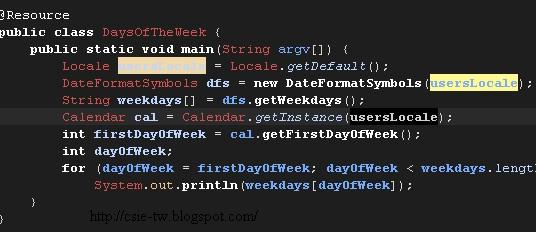
The Vibrant lnk eclipse theme

3. Customize the background of highlighted text

Actually, eclipse allow us to modify the theme. Go to Eclipse -> Preferences -> General -> Editors -> Annotations and you need to change all Occurrences and Write occurrences.

eclipse theme (5)

Customize the background of highlighted text

Finally, you would see this setting makes highlighted text clear.

eclipse theme (4)

The modified Vibrant lnk eclipse theme

2011/06/11

Powerful Web Development & Debug Tool: Aptana & Firebug

1. Aptana

Aptana是一個免費、功能強大、open-source的網頁開發工具,它是基於eclipse的一套IDE軟體。不論是用來編寫HTML, CSS, JavaScript, PHP, Ruby on Rails, Django都有原生支援。以下是他的特點:

Code Assist:

它可以用來幫你檢查程式錯誤,並且給你建議該如何解決,這就像原本的eclipse對Java的錯誤建議一樣好用。而且在你寫程式時,它還會列出支援的瀏覽器,讓你不再為跨瀏覽器支援度苦惱。

code assist

Aptana Code Assist 自動列出html tag

Auto Complete (Intellisense):

這是我最主要使用Aptana的原因之一,它可以自動幫我們填上function的名稱、檔案名稱,懶人必備!

aptana

Aptana Auto Complete (Intellisense) 增加web開發速度

版控軟體Git:

讓你可以跟你的夥伴多方工作,這也是現代軟體開發必須的功能。

git

Aptana與Git的整合

ftp上傳工具:

寫完程式還要另外開ftp clinet上傳程式嗎?Aptana也有內建了!而且他還支援SFTP, FTPS等加密傳輸。

ftp

Aptana 以內建ftp client

Aptana與jQuery的Auto Complete (Intellisense)

如果你的程式不只是用標準的html tag、javascript function,而是需要3rd party的libraty如jQuery的支援,這時候如果還想要支援Auto Complete (Intellisense)功能,則需要再專案加入.sdocml檔案。可以到appcelerator找到完整的.sdocml列表,比如我們要的jQuery則可以下載jquery.1.4.2.sdocml。把它加入專案個根目錄即可。

aptana (2)

在Aptana加入jquery.1.4.2.sdocml

這時候我們再寫jQuery時就可以看到效果了。function的說明、範例一應俱全!

aptana (1)

Aptana對jQuery的Auto Complete (Intellisense)效果

2. Firebug

Firebug真是網頁設計師的好朋友,它可以動態的執行javascript,讓開發者可以很容易知道各function、變數的情況。我們就以jQuery為例來說明:

比如有一個table長這樣:

2011-06-11_174829

Table範例

我們在使用jQuery的selector想要抓出最右邊的column,也就是host id。使用jQuery的語法:

$('#host_list_area tr').find('td[name="hostId"]');

這時候就可以抓顯示出到底這個selector可不可以抓到你想要的element。如下圖,我們可以看到回傳了3個td元素。

aptana (3)

Firebug主控台可以下javascript指令

把滑鼠移到其中一個td,網頁上就會顯示出相對應被選到的元素,實在太方便了。

aptana (4)

被選取的元素

如果我們想要看其中一個td的html碼,就上其上按一下滑鼠左鍵,就會跳到HTML頁面:

aptana (5)       

Firebug HTML頁面: 選擇到的td的html

即使這個html是我使用jQuery動態產生的,一樣可以顯示的出來喔。眼見為憑總是比虛無飄渺的程式碼容易debug!

PS:如果還有其他好用的網頁開發、debug的工具,也請讀者留言告知喔!

2011/05/21

libvirt指令同步、非同步問題

簡介:libvirt是一個對各品牌hypervisor(如Xen、VMWare、KVM等)抽象化的wrapper,比如xen可以透過xm指令來操作hypervisor,但是一旦底層hypervisor從xen改變成其他品牌(如:KVM),那xm指令就不再適用,所以使用libvirt就可以達到抽象畫的目的。

rhel5-virt

libvirt提供一套介面操作各種hypervisor ()

如果我們透過直接使用virsh(libvirt的shell)分成2個視窗執行create/destroy和list的結果,認為virsh command是使用同步執行的方式,也就是動作執行完畢才會返回。

我們先執行create後,馬上執行list,發現create domain-U的結束時間,還比list晚1秒鐘,因使可以推論create時會建立好vm後,就可以讓list去取得列表,但create domain-U後可能還會做一些其他事情,所以回來的時間稍微比list晚一點。因此,可以判斷virsh command應該是同步執行完後才返回。

[root@hyperimagestoreageweb tmp]# virsh create centos1.xml && date

Domain centos1 created from centos1.xml

Fri May 20 16:35:30 UTC 2011

[root@hyperimagestoreageweb ~]# virsh list && date

Id Name State

----------------------------------------------------

0 Domain-0 running

59 centos1 paused

Fri May 20 16:35:29 UTC 2011

但是如果我們使用Python-libvirt這個binding,就會發現有些指令如delete,在指令下去後,馬上就會返回,但是Python-libvirt卻沒有馬上做delete的動作,這是因為我們馬上做list的動作,還是可以看到預計被delete的domain-U一樣存在,所以可以判斷Python-libvirt有些動作是非同步執行,所以要獲得最新的domain-U資料,就必須使用polling反覆詢問。

Xen狀態running/blocked跳動問題

問題:在使用xen建立好一個domain-U後,使用virsh list (或xm list)指令觀察其狀態,可以發現domain-U的狀態常常在running/blocked切換。有些人可能誤以為這是底層xen的bug,但是這是正常現象。

我們可以從man看到xen定義了6個狀態(r - running 、b - blocked 、p - paused 、s - shutdown 、c - crashed 、d - dying),其中的

r - running:

The domain is currently running on a CPU

b - blocked:

The domain is blocked, and not running or runnable. This can be caused because the domain is waiting on IO (a traditional wait state) or has gone to sleep because there was nothing else for it to do.

也就是說running是系統有在執行工作,而blocked則是沒有工作可以做。我做了一個試驗,使用vnc登入domain-U,執行一個無限回圈的程式,在透過觀察後確認那台domain-U會一值處於running狀態。所以blocked和running頻繁的跳動是正常現象,這是因為OS本身的背景服務被執行時就會處於running狀態,隨後又處於blocked狀態。

2011/04/12

Python: Eclipse+Pydev環境安裝教學

前言

Python是一個功能強大、開發快速的程式語言。在業界,Python大量被使用在整合各種系統模組,而這些模組並不需要是Python撰寫的,而可以是C/C++/Java等等。在Google內部,是工程師最愛使用的語言。下面一節將會教你如何在Eclipse透過安裝Pydev撰寫Python成

Eclipse+Pydev環境安裝

0. 安裝Ecplise及JRE,請參考這篇的步驟3和4

1. 安裝Python直譯器(如:Python 3.2 Windows x86 MSI Installer)

http://www.python.org/download/

2. 安裝好後,將

C:\Python32;C:\Python32\Tools\Scripts;

加入Path變數

pydev (5)

2. 接著在Eclipse上安裝Pydev plugins

eclipse

Eclipse->Help-> install New software,填上

name: Pydev

url: http://pydev.org/updates

注意!網路上寫的網址 http://pydev.sourceforge.net/updates/ 是舊資料,已無法使用。最新網址可以到這裡查。

PS:如果要寫javascript、Jquery,可以使用aptana

name: Pydev

url: http://download.aptana.com/tools/studio/plugin/install/studio

3. 為了讓Eclipse裡的Pydev知道Python直譯器在哪,請在

Eclipse -> Window –> Pydev-> Interpreter – Python

image

新增Python直譯器的位置。

New –> Browse –> 填上C:\Python32\python.exe

image

這時候系統會自動選擇相關的模組,直接加入即可。

pydev (7)

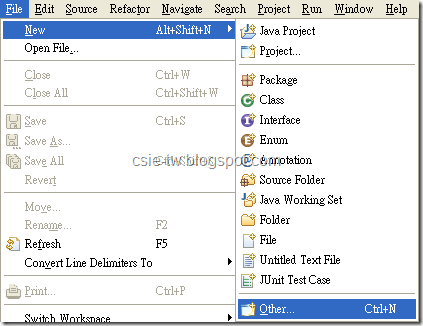
4. 設定完成後,即可新增一個Python專案。由於是第一次使用,所以選單列不會出現Python專案的選項,先選擇Other。

pydev (8)

然後選擇Pydev Project

pydev (9)

5. 打上project name,選擇Python的版本

pydev (10)

6. 在新增的專案按右鍵,建立一個新的Pydev package。

pydev (1)

7. 為package命名

pydev (2)

8. 接著在預設的原始碼(__init__.py)打上程式碼如下:

print(‘csie-tw.blogspot.com’)

並且在檔案上按右鍵->Run as-> Python Run

pydev (3)

9. 如果再Console可以看到畫面就是成功了!

pydev (4)

10. 參考資料

http://pydev.org/manual_101_root.html

Buddhism and Software Developer

In today's fast-paced society, we are often surrounded by work, goals, and external pressures. However, the wisdom found in Buddhism off...